
Windows taskbar companion
NextUp Alert lives in your taskbar.
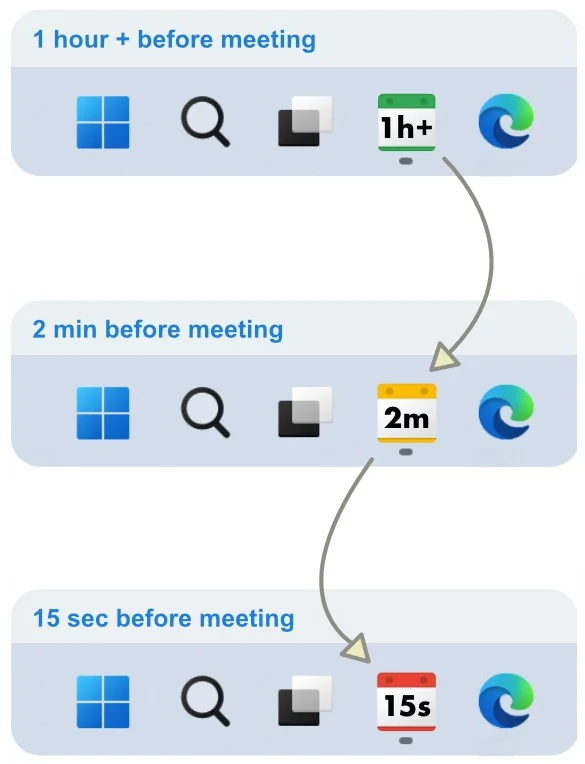
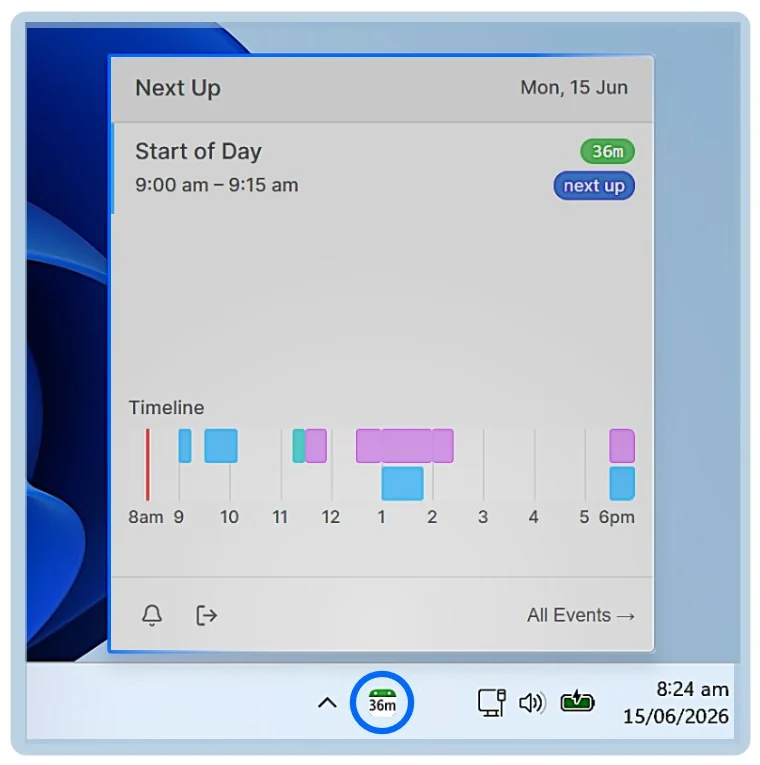
NextUp Alert is a calendar reminder app for Windows that turns the taskbar into a live countdown to your next meeting. Green while you have time. Yellow when it is close. Red when it is now. One glance and you know — no clock watching, no switching windows.
Free · Windows 10 and 11, including ARM64 · Works with Google Calendar or Outlook (Microsoft 365)
At a glance
See it work
A day, handled
The taskbar countdown, the popup and the spoken reminder, in the order you meet them on an ordinary working day.
The idea
One icon. Three states. Nothing to think about.
A normal calendar fires one notification and hopes for the best. NextUp Alert keeps the time remaining in front of you the whole way down, so you never have to ask “how long have I got?”
Green — you have time
Hours or tens of minutes away. Stay in deep work; the icon is just there, quietly counting.
Yellow — start wrapping up
Minutes out. Time to finish the thought, save the file and stop starting new things.
Red — go now
Seconds left. The popup is up, the voice has spoken, and the join button is one click away.
Readable without switching windows
That is the whole point. The information you need lives in the one strip of screen that is always visible, in a colour you can read from the corner of your eye — not behind a notification you already dismissed.
- Counts down in hours, then minutes, then seconds
- Colour changes at thresholds you choose
- Hover for the meeting name, time and a join button
Calendar alerts
Told the way you actually need to be told
Use one, or stack all of them. Set the reminder times once — say four minutes, forty seconds and a final ten-second call — and then forget the clock.
Popups you cannot miss
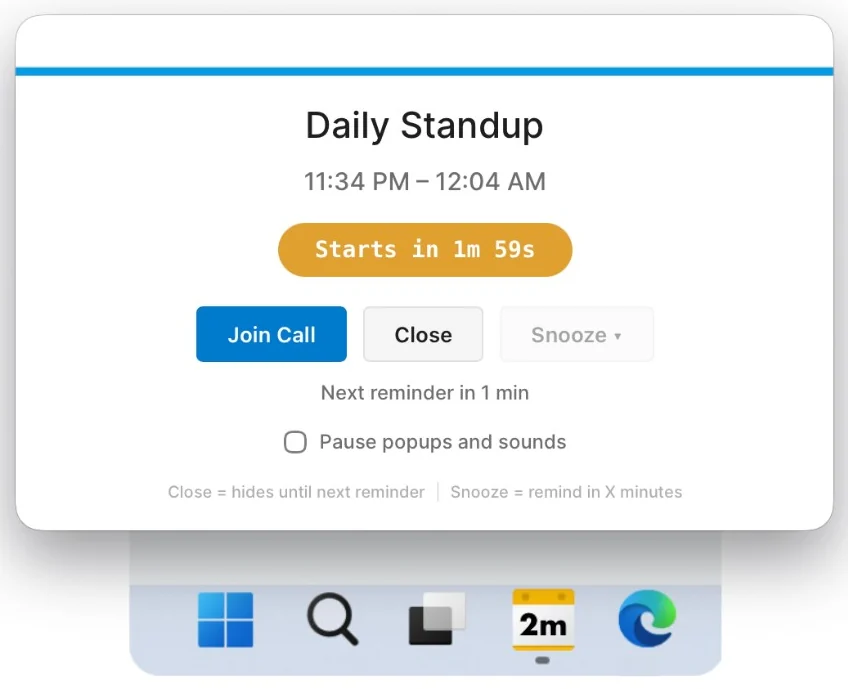
The reminder overlays every other window, shows a live countdown, and puts Join, Close and Snooze in reach. Close hides it until the next reminder; Snooze brings it back in a few minutes.
- Overlays full-screen apps and shared screens
- Live countdown, not a static “in 10 minutes”
- Join the call straight from the popup
A voice, not just a chime
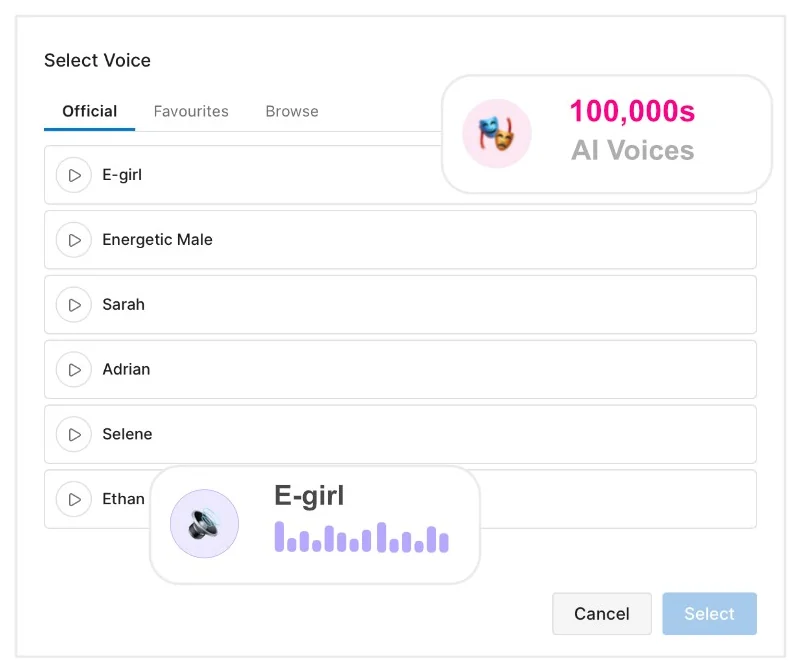
Spoken reminders announce the time out loud — “Event starts in 2 minutes” — so you can keep your eyes on what you are doing. The optional AI voices go further and read the actual meeting title.
- Spoken countdowns are included, at no cost
- AI voices read the real event name — that one is a paid extra
- Escalating alarms rise in volume if you are away from the desk
- Notification sounds if you would rather not have speech
One-click join
Stop digging through the invite for the link
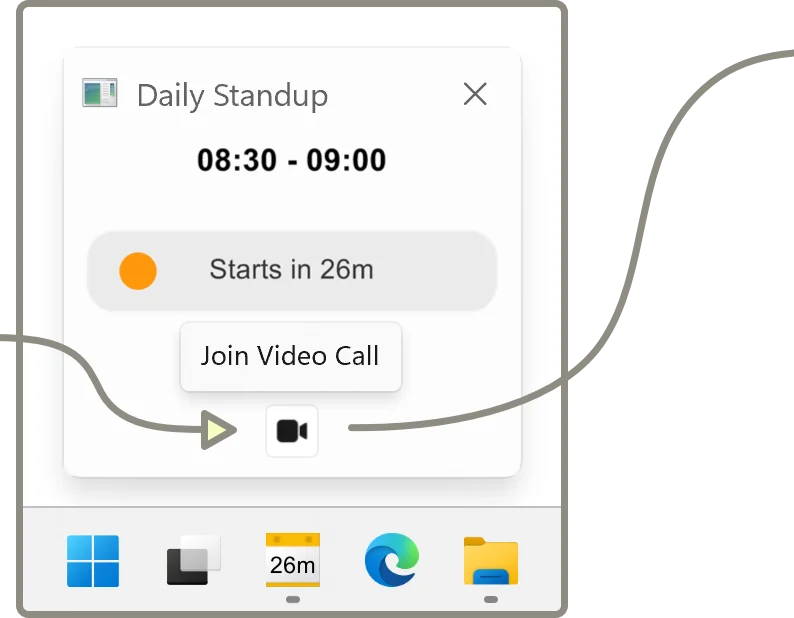
NextUp Alert finds the meeting link in the calendar entry and puts a Join button in the popup, in the taskbar preview and behind a keyboard shortcut. One click and you are in.
- Microsoft Teams
- Zoom
- Google Meet
Your calendars
Connects to the calendar you already use
Sign in with the account you already have. No new account to create, nothing to migrate, and your existing invites keep working exactly as they do now.
Google Calendar
Desktop notifications without leaving a browser tab open, plus one-click Google Meet.
Outlook & Microsoft 365
Reminders you actually notice, for work calendars that live in Microsoft 365.
Windows 10 & 11
A native desktop app, not a browser extension. Runs on ARM64 too.
Every calendar in one timeline
Connect the account your meetings live in, Google or Microsoft. Every calendar on it, shared calendars included, merges into a single timeline, and filters let you hide the meetings that do not deserve an alert.
Optional paid extra
Know what the day looks like before it starts
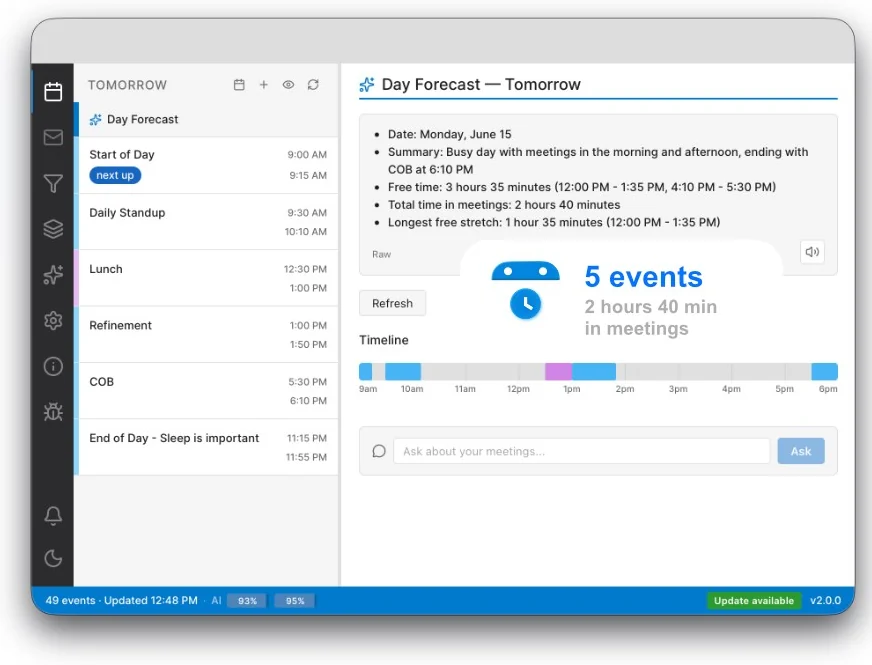
The AI day forecast reads your schedule and tells you what is coming: how many events, how much of the day is in meetings, and where the longest free stretch is. Spoken aloud if you want it, and you can write the prompt yourself.
- A written and spoken summary of your day
- Smart rules — be told when an event is moved or cancelled
- A paid extra, off until you turn it on — everything above is free
Why it exists
Built by someone who kept being late
A one-minute reminder never worked. I would tell myself I could squeeze in one more little thing while coding — and then I was late. Worse, meetings pulled me out of deep work and made me watch the clock all morning.
So I built the opposite: a calm traffic light that shows how much time is left without me having to think about it. That one idea grew into the app.
If it helps you too, the community on Reddit is where features get requested and questions get answered.
Time blindness
If “ten minutes” does not mean anything to you
A single notification gets dismissed and forgotten, buried under other alerts, or missed entirely during hyperfocus. Making the time remaining continuously visible removes the need to estimate it — which is exactly the part that does not work for a lot of people with ADHD.
Before you install
The questions people ask first
Is it free?
Yes. NextUp Alert is free on the Microsoft Store, with no account to create and no card required. Some later additions — the AI day briefing and the AI voices — are optional paid extras, and everything described on this page works without them.
Does my calendar data leave my computer?
Reminders are generated on your machine from your calendar. If you turn on the optional AI features, the relevant event details are sent to the AI provider to produce the summary or the spoken audio. The privacy policy sets out exactly what is sent, to whom, and how long it is kept, and the compliance page lists every sub-processor.
Will it slow my PC down?
It sits quietly in the background between reminders, and it does not need a browser window or Outlook to be open to do its job.
How is this different from the reminders already in Windows?
Built-in reminders fire once and disappear; NextUp Alert keeps the time remaining visible until the meeting starts. See what a meeting reminder should do for the full comparison.
Community spotlight
Someone else’s account of it
JMS got in touch to ask whether he could make a video about NextUp Alert. He was not paid for it, and we had no say in what he said. It seemed more useful to point you at his version than to write another page of our own.
Stop watching the clock.
Set your reminders once. NextUp Alert handles the rest, quietly, from the taskbar.


Free · Windows 10 and 11 · Google Calendar or Microsoft 365 · No account required