
The taskbar countdown
A meeting countdown timer in your taskbar
Not a notification. A number that is simply always there, in the one strip of screen that never gets covered up — and a colour that tells you how urgent it is before you have finished reading the number.
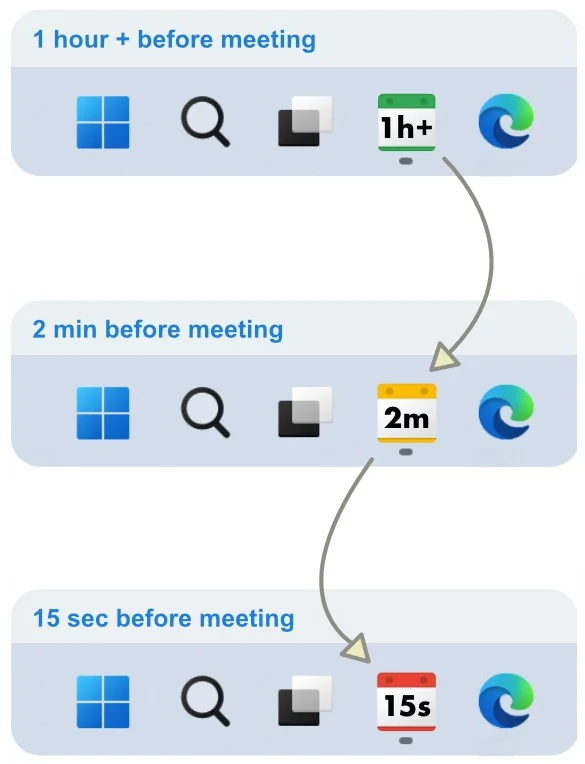
How the three states work
You set the thresholds. These are the defaults, and they map to what you would actually do at each point.
Green
Hours or tens of minutes out. Nothing to do. The number is there if you glance, and invisible if you do not.
Yellow
Minutes out. This is the useful one: the moment to stop starting things and finish the thing you are on.
Red
Seconds. By now the popup is up and the voice has spoken, and the icon is just confirming it.
Why a countdown beats a notification
A notification is a single event. It happens once, competes with everything else on screen at that instant, and then it is over. If you were mid-thought, it is gone.
A countdown is a state. You do not have to catch it at the right moment, because it is still there five minutes later. That difference matters most during deep work, which is exactly when a missed alert is most expensive.
It also answers a question a notification never does: how long have I actually got? Fifteen minutes and three minutes call for completely different decisions.
What else the icon does
Hover preview
Point at the icon for the meeting name, its start and end times, and a button to join the call.
Tray pop-out
Click for a timeline of the whole day, colour-coded by event, with the next one highlighted.
In-meeting countdown
Once the meeting starts, the icon can count down the time left in it instead — so you finish on time.
Overlap awareness
When two meetings overlap, the in-meeting countdown steps aside rather than showing an ambiguous number.
Hours, minutes, seconds
The unit changes as the event approaches, so the display stays readable at a glance the whole way down.
Quiet by default
Filtered and muted events do not drive the countdown, so it only ever reflects meetings you care about.
If you find time hard to estimate
Making the remaining time continuously visible removes the need to estimate it at all. That is the whole mechanism, and it is why the taskbar countdown is the feature people with ADHD tend to mention first. More on time blindness and external time cues.
See your next meeting without looking for it
Free on the Microsoft Store. Works with Google Calendar and Microsoft 365.