
For every calendar
The meeting reminder app that counts down instead of pinging once
Most meeting reminders fire once, then disappear. NextUp Alert keeps a live countdown in your Windows taskbar until the meeting actually starts — however you get your calendar.
Free · Windows 10 and 11 · Works with Google Calendar or Outlook (Microsoft 365)
What goes wrong with most meeting reminders
It fires once and vanishes
A single pop-up that disappears again does not help if you glanced away at the wrong moment.
It needs the source app open
Close the browser tab or the calendar app it came from, and the reminder goes with it.
No sense of "how long until"
One alert cannot tell you whether you have thirty seconds or three minutes left.
It gets lost in the stack
Clear a pile of notifications and the one that mattered is dismissed along with everything else.
If your reminders were working and have stopped, the cause is usually platform-specific: see the fixes for Outlook reminders that do not pop up or Google Calendar notifications not working.
A countdown, not a one-off ping
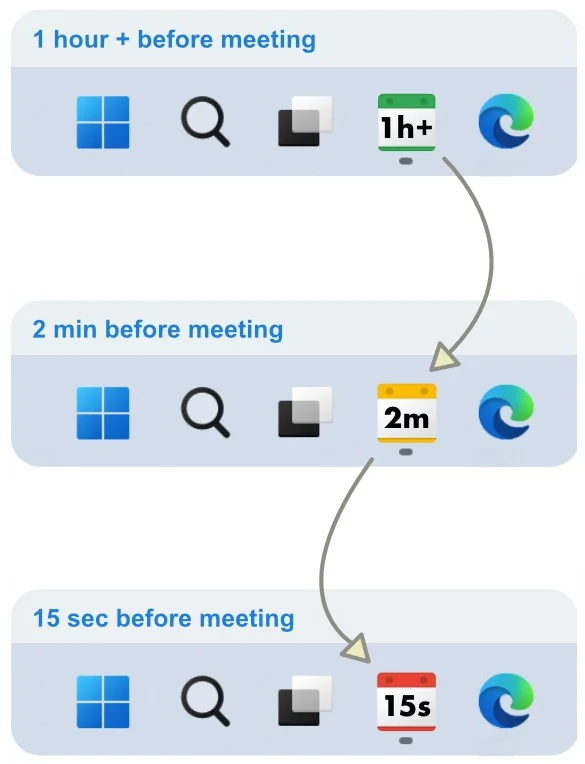
- A taskbar icon that counts down continuously — green, then yellow, then red as the meeting nears
- Popups that overlay every window and stay until you dismiss them
- A spoken countdown telling you how long is left, included free
- Escalating alarms that get louder the closer it gets
- One-click join, with the video link already found for you
Works with the calendar you already have
NextUp Alert does not need you to switch calendars — it reads the one you already use.
Google Calendar
Every calendar on the account, including shared ones, synced every five minutes.
Outlook & Microsoft 365
Works whether or not Outlook is running, because it talks to the calendar service directly.
One account, one timeline
Connect the account your meetings live in — Google or Microsoft. Every calendar on it, shared calendars included, merges into a single timeline, and filters hide the rest.
Built specifically for Windows
NextUp Alert is a native Windows app, not a browser extension or a tab you have to leave open — it runs in the system tray and keeps working with everything else closed. See how it compares to the reminders already built into Windows.
Common questions
How is this different from the reminders already in my calendar app?
Built-in reminders fire once and disappear. NextUp Alert keeps the time remaining visible the whole way down, escalates as the meeting approaches, announces the countdown aloud, and gives you a one-click join. It also pulls every calendar on the account you connect into one timeline and lets you filter out the meetings you do not want to be alerted about.
Is the voice reminder free?
Yes — the spoken countdown that tells you how long you have left is included free. An AI voice that reads out the actual meeting title is a paid feature.
Does it work with Google Calendar and Outlook at the same time?
It connects to one account — Google or Microsoft — so you connect the account your meetings live in. Every calendar on that account, shared calendars included, merges into a single timeline.
Ready for a meeting reminder that doesn't let go?
Free on the Microsoft Store. Connect Google Calendar or Outlook and put the countdown where you can see it.