
One-click join
Join Teams, Zoom and Meet in one click
The thirty seconds you spend finding the meeting link is why you arrive late. NextUp Alert pulls the link out of the calendar entry ahead of time and puts a Join button everywhere you might reach for it.
Free · Windows 10 and 11 · Microsoft Teams, Zoom, Google Meet and others
Three ways to get in
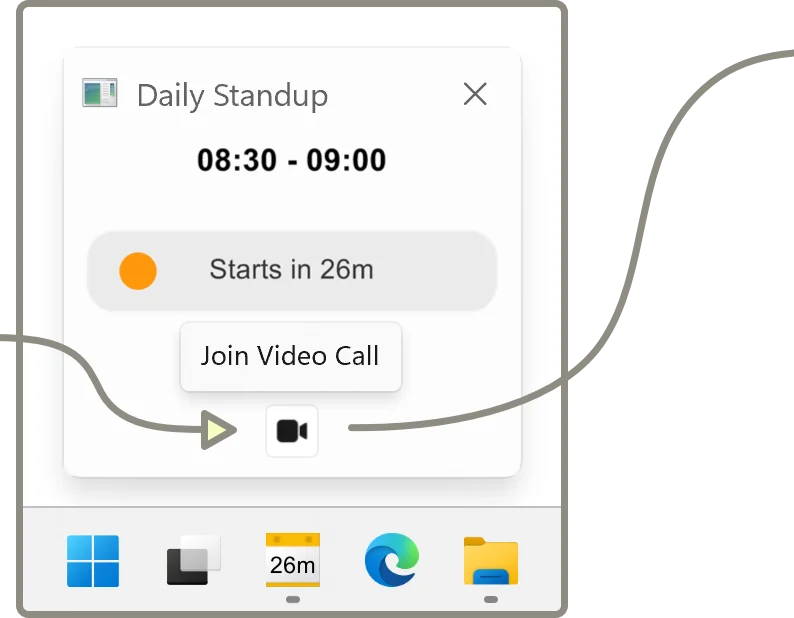
- From the popup. The reminder that overlays your screen already has the Join button on it.
- From the taskbar. Hover the icon for a preview of the meeting with a join action, without opening anything.
- From anywhere. Press Ctrl+Alt+M and the link for your current or next meeting opens, whatever app you are in.
The keyboard shortcut is the one people end up using most — particularly when a call ends early and you want to jump straight into the next one, or when you drop out and need to rejoin quickly.
Platforms it recognises
NextUp Alert looks for meeting links in the event body, the location field and the conferencing data your calendar attaches.
- Microsoft Teams
- Zoom
- Google Meet
- and other platforms that put a link in the invite
No copy and paste
You never open the invite, scroll past the dial-in numbers and hunt for the URL.
Opens the right thing
The link opens the way it normally would on your machine — in the desktop client if you have one.
Works with either calendar
The link is found the same way whether the invite came from Outlook or Google Calendar.
Filter out the rest
Events with no video call can be filtered or muted, so the join action is only ever offered when there is something to join.
Back-to-back calls
The hard case is not one meeting. It is five, where each one runs slightly over and the gap between them is the time you were going to use to find the next link.
Wrap-up reminders
Up to five alerts before the current meeting ends, so you start closing down while you still have a minute.
Ctrl+Alt+M straight after
The moment one call ends, the shortcut already points at the next one. No app to open in between.
Overlap handling
When two meetings genuinely clash, NextUp Alert tells you rather than silently counting down to one of them.
Dismiss what you are skipping
Dismiss a single occurrence and it stops competing for attention, without affecting the rest of the series.
Never hunt for a meeting link again
One click from the popup or the taskbar, or Ctrl+Alt+M from anywhere.