
Windows 10 & 11
A calendar reminder app built for Windows
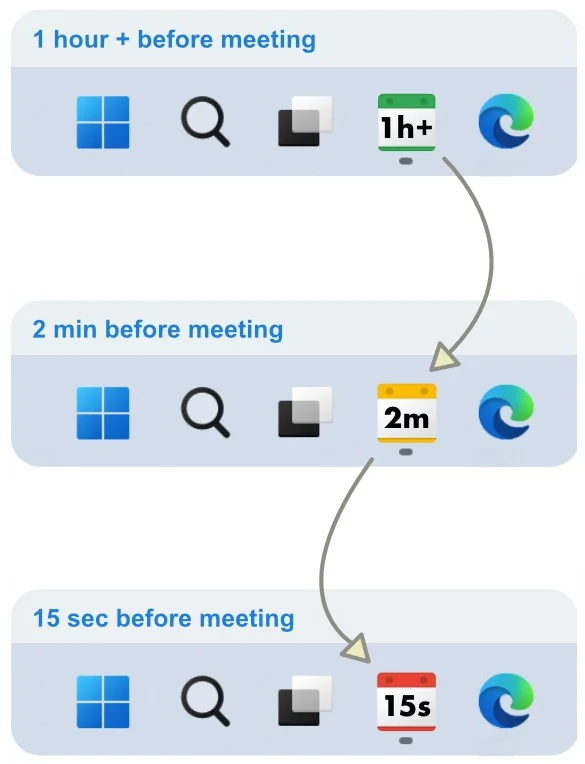
NextUp Alert is a native Windows desktop app, not a browser extension and not a web page you have to leave open. It watches your Google or Microsoft calendar and turns the taskbar into a live countdown to whatever is next.
Free · Windows 10 and Windows 11 · x64 and ARM64
Why a desktop app and not a browser tab
Web calendar notifications depend on a browser being open, on the right profile being signed in, and on a notification that vanishes after a few seconds. If you close the tab to focus, you lose the reminders — which is exactly when you need them most.
A desktop app has none of those dependencies. It runs in the system tray from boot, keeps working when every browser window is closed, and can draw on the taskbar itself. (Wondering about the calendar side? See the options for a Google Calendar desktop app.)
- No browser required, and no extension to keep installed
- Outlook does not need to be running either
- Starts with Windows, straight to the system tray
- Detects wake from sleep and re-syncs before the next reminder
How it compares to the reminders already in Windows
The Windows Calendar app is fine for looking at your week. It is the alerting that falls short.
| Windows Calendar | NextUp Alert | |
|---|---|---|
| Alerts per event | One, limited options | Up to 5 before the start and 5 before the end |
| Time remaining | Not shown | Live countdown in the taskbar icon |
| Urgency | Same notification every time | Green, yellow and red as it approaches |
| Spoken alerts | No | Announces the countdown — “Event starts in 2 minutes” |
| If you miss it | Notification disappears | Alarm escalates until dismissed |
| Joining a call | Open the event, find the link | One click, or Ctrl+Alt+M from anywhere |
| Filtering | Basic | Filter or mute by title, organiser, status and more |
| End-of-meeting | Start times only | Wrap-up reminders before an event ends |
Runs properly on modern Windows hardware
ARM64 native
Built for Surface Pro X and Copilot+ PCs, not run through emulation. Few calendar reminder apps are.
Stays out of the way
Runs in the system tray from login to shutdown, with nothing to open or think about.
Windows 10 and 11
Installed and updated through the Microsoft Store, so it stays current on its own.
Setting it up
-
Install from the Microsoft Store
Free, and no account to create with us.
-
Connect a calendar
Sign in with the Google or Microsoft account you already use. Pick which calendars matter — hide the subscribed and shared ones you never look at.
-
Choose your reminder times
For example four minutes, forty seconds and a final ten-second call, each with its own alert type.
-
Forget about it
The taskbar handles the rest. Come back only when you want to add a filter.
Looking for the older free app?
NextUp Alert Lite is the original Windows-only version — no AI features, on-device voice only. It is still available and still free on the Microsoft Store, rated 4.5 out of 5 from 124 ratings.
Put the countdown in your taskbar
Free on the Microsoft Store. Works with the calendar you already have.