
Time blindness
When “ten minutes” does not mean anything
Time blindness is difficulty sensing how much time has passed and how much is left. A reminder that fires once and then leaves you to estimate the rest is asking for exactly the thing that is hard. NextUp Alert shows the number instead.
Free · Windows 10 and 11 · No account required
What time blindness actually is
It describes difficulty with time perception rather than memory: judging how long something has taken, how much of a gap is left before the next thing, and how long a task will take before you start it. It is not forgetting the meeting. It is knowing the meeting is at three, and being caught out anyway at 2:58.
The phrase is descriptive, not diagnostic. Time blindness is not a diagnosis in its own right — it does not appear in the DSM-5, and there is no test that returns it as a result. It comes out of ADHD research and ADHD communities as a plain-English name for something that shows up repeatedly when time estimation is measured, and it gets used more broadly now. Most people recognise a version of it after a few hours of deep concentration.
What people usually mean by it
- Durations do not register. Two hours of work and twenty minutes of it feel much the same from the inside.
- The gap before something vanishes. Forty minutes until the next call is plenty of time, and then it is gone with nothing done in it.
- Estimates are wrong in a consistent direction. Usually far too optimistic, and usually by roughly the same margin every time.
- Only the last moment feels real. Nothing is urgent until it is suddenly overdue, with no gradient in between.
Any of that sound familiar? You can take our time blindness test — it does not ask you whether you lose track of time, it measures it: you reproduce intervals, make a minute without a clock, and get your error back as a number. It takes a few minutes, needs no email, and it is not a diagnosis.
Why one notification is not enough
A single alert at fifteen minutes assumes you will do three things with it: notice it, hold it in mind, and keep an accurate running estimate of the time remaining. Those are three separate demands, and the app has helped with none of them.
Dismissed and forgotten
The alert is cleared reflexively along with everything else, and the information it carried goes with it.
Lost in the pile
It arrives alongside a dozen other notifications and stops being distinguishable from any of them.
Missed during hyperfocus
Deep in a task is precisely when an interruption does not land — and precisely when you are most likely to run over.
“I have loads of time”
Without an external reference, the estimate drifts. Fifteen minutes feels the same as forty until it suddenly does not.
An external clock that does the estimating
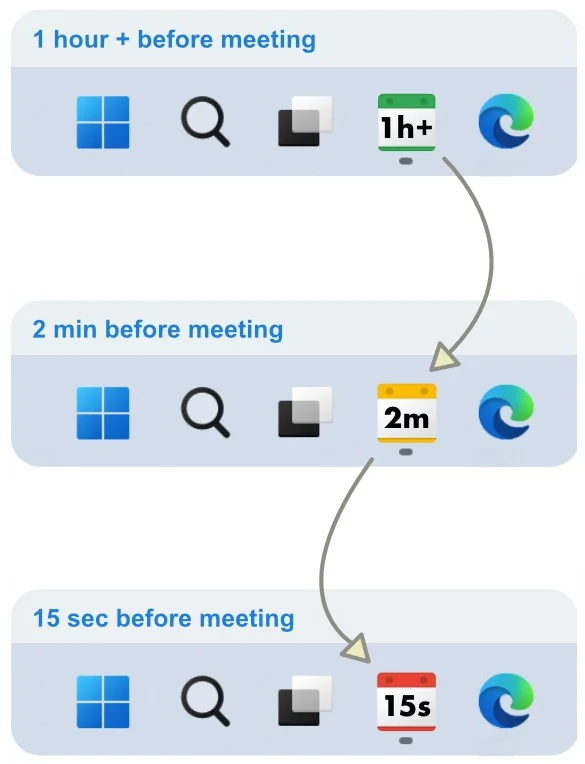
The idea is straightforward: if judging elapsed time internally is unreliable, put the answer on the screen and keep it there. No recall, no arithmetic, no deciding whether it is worth checking.
- Always visible. In the taskbar, which nothing covers, rather than in a notification you have to catch.
- Colour before number. Green, yellow and red register in peripheral vision — you know it is urgent before you read it.
- Persistent, not momentary. Miss the exact instant and the information is still there.
- Escalating. Alarms rise in volume and keep going until you actually deal with them.
- Spoken. Cuts through hyperfocus better than anything visual, and announces the countdown out loud. The paid AI voices read the event name itself.
Settings worth changing on day one
The defaults are conservative. These are the adjustments people tend to make when the problem is time perception rather than forgetfulness.
-
Stack several reminders, not one
Something like ten minutes, four minutes, forty seconds and a final ten-second call. The early ones let you plan; the late ones actually move you.
-
Turn on voice announcements
Speech cuts through concentration in a way a silent popup does not, and hearing the countdown means you do not have to look up to find out how long you have.
-
Widen the yellow threshold
If you routinely need longer to disengage, move yellow further out. Yellow is the signal that means stop starting things.
-
Add end-of-meeting reminders
Overrunning is the other half of the problem. A nudge before an event ends is what stops one late finish cascading through the afternoon.
-
Filter hard
Mute all-day events, declined invitations and anything without a video link. An alert you have learned to ignore is worse than no alert.
To be clear about what this is
NextUp Alert is a calendar reminder app, not a medical device, a treatment or a substitute for professional support. It does one narrow thing — it makes the time remaining until your next commitment continuously visible — and some people find that removes a specific daily friction. If time management is significantly affecting your life, that is worth discussing with a clinician.
People who use it this way talk about it in the r/NextUpAlert community, which is also where feature requests get made.
Common questions about time blindness
Is time blindness a real diagnosis?
No. It is a descriptive phrase rather than a clinical one — it does not appear in the DSM-5, and nobody is diagnosed with it. The underlying difficulty judging durations is well documented: a 2021 meta-analysis in JAACAP (Marx, Cortese, Koelch & Hacker) pooled 26 reproduction studies covering 2,364 people and found a medium-sized increase in absolute timing error for people with ADHD. “Time blindness” is simply the everyday name that stuck.
Is there a test for time blindness?
Not a diagnostic one. Researchers measure time perception with estimation and reproduction tasks — hold a duration in mind, then reproduce it — but those are research instruments, not something that returns a verdict about you. The online quizzes are not assessments either. If it is affecting your work or your relationships, an ADHD assessment with a clinician is the route that actually leads somewhere.
Is time blindness only an ADHD thing?
No, though ADHD is where the term is used most. Difficulty tracking time is also described in autism, in depression, after a brain injury, and by people who are simply short of sleep or deep in a task. What tends to distinguish the ADHD version is that it is persistent rather than situational.
Can an app fix time blindness?
No, and anything claiming otherwise is worth distrusting. What software can do is remove the need to estimate: if the minutes remaining are on screen continuously, your internal sense of time is no longer the thing standing between you and turning up. That is the whole of what NextUp Alert does here.
Stop estimating. Just look.
Free on the Microsoft Store, and about a minute to set up.