
Google Calendar
Google Calendar notifications on your Windows desktop
Browser notifications only work while the browser is open, on the right profile, with the tab alive — and then they disappear after a few seconds. NextUp Alert gives you desktop notifications that do not depend on any of that.
Free · Windows 10 and 11 · No browser or extension needed
“Alerts” vs “desktop notifications” — what Google’s two settings mean
In Google Calendar’s settings you choose between two notification styles, and the names do not explain themselves. The difference is where they appear and how long they stay.
Desktop notifications
Delivered through your browser to the Windows notification system. A toast appears in the corner of the screen, waits a few seconds, then slides into the notification centre — read it in time or lose it.
Alerts
A pop-up window opened by the browser itself. It stays on screen until you dismiss it — but it only appears while Google Calendar is open in a browser tab.
So alerts are harder to miss, and desktop notifications are less intrusive — but both depend on the browser being open, on the right profile, at the moment the reminder fires. That shared weakness is why NextUp Alert exists: its countdown and pop-up reminders come from a Windows app, with no browser involved at all. And if it is the calendar itself you want on the desktop, see your options for a Google Calendar desktop app.
“My Google Calendar notifications disappear too quickly”
It is one of the most common complaints about browser-based calendar alerts on Windows, and it has three separate causes.
- Windows toast notifications auto-dismiss. Look away for ten seconds and it is gone into the notification centre.
- The browser has to be running. Close it — or restart after an update — and nothing fires at all.
- Multiple Google profiles. Notifications only come from the profile that has the calendar tab open.
A desktop app removes all three problems at once, because it does not involve a browser and it does not rely on a notification you can miss. If your notifications are not appearing at all rather than vanishing too fast, work through the nine fixes for Google Calendar notifications not working first.
Notifications that stay until you deal with them
- A taskbar icon counting down continuously, not a toast that vanishes
- Popups that overlay every other window and stay put
- Alarms that rise in volume until dismissed
- Spoken reminders that announce the countdown out loud
- Up to five alerts per event instead of Google’s limited set
- Syncs every five minutes, and keeps firing while you are offline
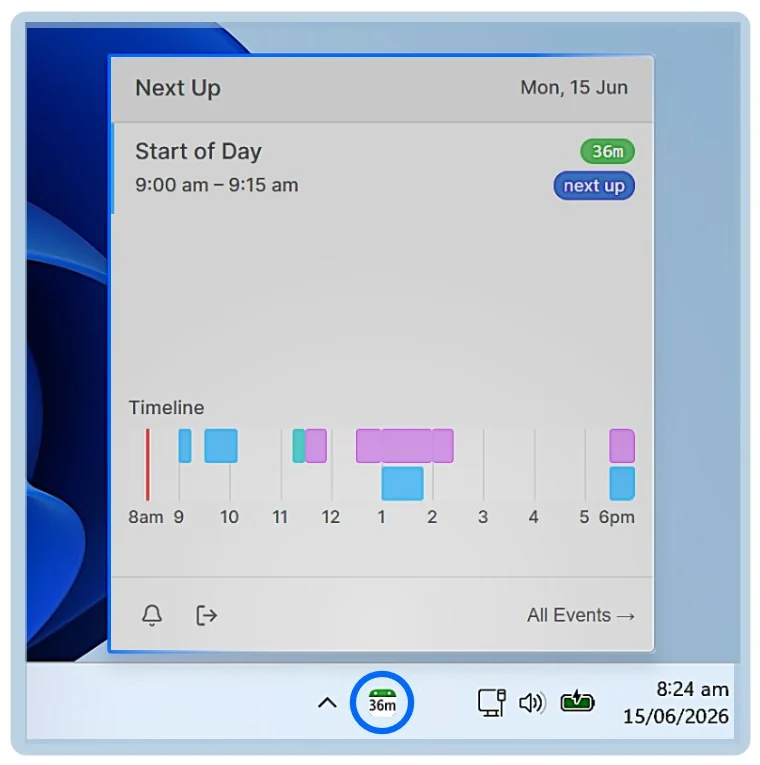
Your Google calendars, exactly the ones you want
Most Google accounts accumulate calendars — a birthdays calendar, a holidays calendar, two shared team calendars and something a colleague subscribed you to in 2023. Alerting on all of them is how people end up ignoring alerts entirely.
Choose your calendars
Enable and disable each calendar on the account individually, including shared ones.
Filter within them
Hide or mute all-day events, declined invitations, events with no video link, or anything matching a keyword.
One click into Meet
The Google Meet link is pulled from the event and put in the popup, the taskbar preview and behind Ctrl+Alt+M.
Or a work account
If your meetings live in Microsoft 365 instead, it connects there the same way. See Outlook reminders.
What NextUp Alert does with your calendar data
You sign in with Google’s own consent screen and grant read access to your calendar. Reminders are then worked out on your machine from those events. If you turn on the optional AI features, the relevant event details are sent to the AI provider so it can produce the summary or the spoken audio — that is the only case where event content is deliberately sent anywhere. Separately, crash and performance logs are uploaded for diagnostics; they are redacted on your device first, which the privacy policy describes as a best-effort process rather than a guarantee.
The full detail, including every sub-processor and how long anything is kept, is in the privacy policy and on the compliance page. Use of Google user data follows the Google API Services User Data Policy, including its Limited Use requirements.
Common questions
What is the difference between alerts and desktop notifications in Google Calendar?
Desktop notifications go through the Windows notification system: a toast in the corner that disappears after a few seconds. Alerts are pop-up windows opened by the browser that stay until dismissed — but they only fire while Google Calendar is open in a tab. Neither works with the browser closed, which is the gap NextUp Alert fills.
Do I need Chrome or a browser tab open?
No. NextUp Alert is a native Windows app that talks to Google’s calendar service directly. The browser can be closed, mid-update or signed into the wrong profile — reminders fire regardless.
Will it change anything in my Google Calendar?
No. It asks for read access only. Filtering, muting and dismissing affect what NextUp Alert shows and says — nothing is written back to your calendar and no one is notified.
What happens if my internet connection drops?
Events that have already been synced keep triggering reminders while you are offline, and syncing picks up again on its own when the connection returns.
Desktop notifications that do not vanish
Connect your Google Calendar and put the countdown in your taskbar.