
Outlook & Microsoft 365
A reminder app for Outlook you actually notice
The Outlook reminder window opens behind whatever you are working on, gets dismissed with everything else in the stack, and then says nothing more. NextUp Alert reads the same Microsoft 365 calendar and keeps the time remaining in front of you instead.
Free · Windows 10 and 11 · Outlook does not need to be open
What goes wrong with the built-in reminder
It hides behind other windows
The reminder dialog does not always come to the front, especially while you are presenting or in another full-screen app.
Dismiss All is one click away
When reminders pile up, clearing the stack takes the important one with it — and there is no second chance.
It tells you once
Fifteen minutes before is a single moment in time. Nothing tells you the meeting is now two minutes away.
It needs Outlook running
Close Outlook to concentrate and the desktop reminders go with it.
If your reminders have stopped appearing at all, work through the eight fixes for Outlook reminders that do not pop up — including the two settings new Outlook changed. If it is your Teams meetings that never warn you, the cause is different: Teams has no advance reminder of its own.
What NextUp Alert does instead
It connects to your Microsoft 365 calendar directly, so it keeps working whether or not Outlook is open — and it never stops telling you how long you have.
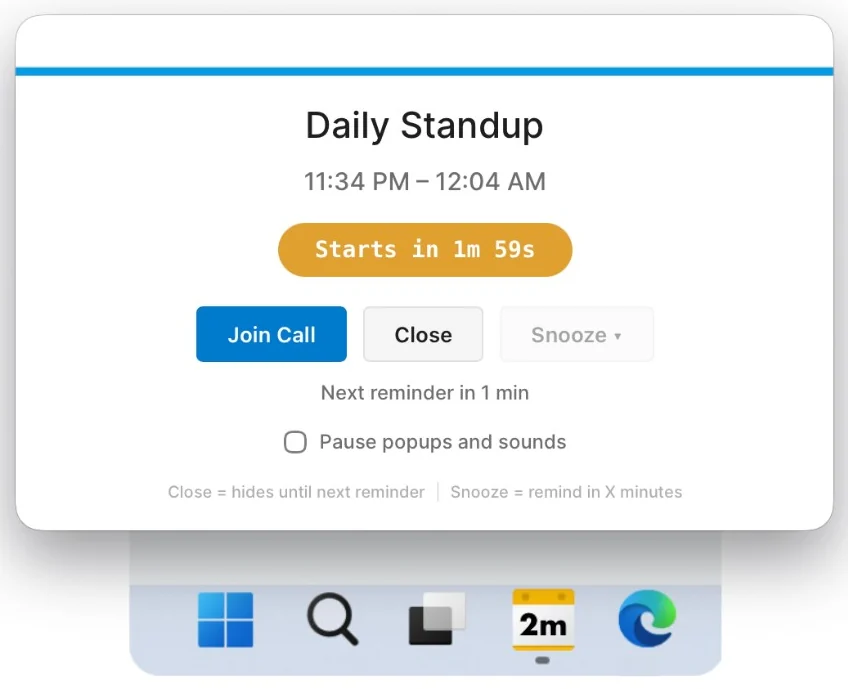
- A taskbar countdown that is visible the whole way down, not one alert
- Popups that overlay every window, including full-screen and shared screens
- Spoken announcements that count down to the start
- Escalating alarms that keep going until you dismiss them
- Up to five reminders before the start, and five before the end
- Syncs every five minutes, including shared calendars
Built for calendars that are mostly meetings
If your Outlook calendar is wall-to-wall, the problem is not remembering that a meeting exists. It is knowing when to stop the thing you are currently doing.
Wrap-up reminders
Alerts before an event ends, so you finish the conversation instead of running into the next call.
Overlap detection
Double-booked slots are handled deliberately rather than producing a confusing countdown to two things at once.
Declined meetings stay quiet
Filter on event status so declined and tentative invitations stop alerting you — without changing anything in Outlook.
Teams in one click
The Teams link is pulled out of the invite and put in the popup, the taskbar preview and behind Ctrl+Alt+M.
Or a Google calendar
If your meetings live in Google Calendar rather than Microsoft 365, NextUp Alert works there the same way — same countdown, same popup, same one-click join. See Google Calendar notifications.
Common questions
Does Outlook need to be open for this to work?
No. NextUp Alert talks to the Microsoft calendar service directly and works independently of the Outlook desktop app.
Does it work with shared and delegated calendars?
Yes. It supports all the Microsoft and Outlook calendars on your account, including shared ones, and you choose which of them it watches.
Will it change anything in my Outlook calendar?
No. Filtering, muting and dismissing affect only what NextUp Alert shows and says. Nothing is written back, nothing is declined, and no one is notified.
Stop missing Outlook reminders
Connect your Microsoft 365 account and put the countdown where you can see it.